
Radar orientation
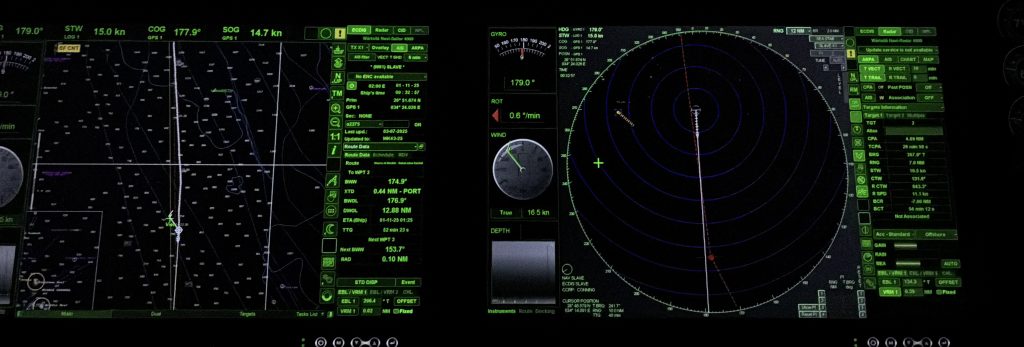
Introduction to Basic Radar- For New Lookouts & Bridge Watch keepers
1. What Radar Is (and What It Is Not)
RADAR = Radio Detection And Ranging- This means we using radio waves transmitted in a specific direction(bearing) and the time it takes for the wave to travel out and come back is converted into a measurement of range and bearing
Radar works by:
- Transmitting a short pulse of radio energy
- The pulse travels at the speed of light
- It strikes an object (ship, land, buoy, squall)
- Part of the energy reflects back to the antenna
- The radar calculates:
- Time delay → Distance (range)
- Antenna direction → Bearing
Key Understanding for Lookouts
Radar does not “see” objects — it displays reflected energy.
This means:
- A large steel vessel produces a strong, clear echo
- A small wooden or fiberglass boat, kayak, or RHIB may:
- Appear weak
- Appear intermittently
- Not appear at all
- Rain, squalls, sea clutter, and swell can:
- Create false echoes
- Mask real targets
- Change rapidly with conditions
⚠️ Radar can lie — confidently.
Critical Watchkeeping Rule
Radar supports the lookout — it never replaces eyes, ears, AIS awareness, or judgement.
2. Radar Orientation Modes(How the Picture Is Presented)
Understanding orientation is essential before trusting bearings and movement.
North Up (N-Up)
- North is always fixed at the top of the screen
- The radar picture does not rotate
- Own ship moves within the picture
✅ Best for:
- Overall situational awareness
- Chart comparison
- Training and teaching radar interpretation
- Understanding relative geography
🧠 Think of it as a moving chart with radar echoes
⚠️ Slightly slower for immediate collision decisions unless the user is experienced.
Head Up (HU)
- Ship’s heading is always at the top
- The radar picture rotates as the vessel turns
- Targets move relative to the ship’s bow
✅ Best for:
- Immediate collision avoidance
- “What is directly ahead of me right now?”
⚠️ Caution for new lookouts
- Bearings are relative, not true
- A course change rotates the entire picture — this can be disorientating
Course Up (CU)
- Top of screen aligns with vessel’s Course Over Ground
- Picture remains stable unless course changes significantly
- Resets when course change exceeds a preset value
✅ Best for:
- Planned track monitoring
- Long steady legs
- Pilotage support when course is stable
⚠️ Less intuitive during frequent manoeuvring.
3. Initial Radar Setup
The First 60 Seconds
Before interpreting targets, the radar must be properly set.
Poor setup = false confidence.
a) Range Scale
- Short ranges (0.75–3 NM):
- Collision avoidance
- Close-quarters monitoring
- Medium to long ranges (6–12 NM+):
- Traffic awareness
- Weather and land detection
🔑 Best Practice
- Always scan at least two ranges
- If close range is clear:
- Increase range to detect developing situations early
b) Gain
(Receiver sensitivity — critical for small or weak targets)
- Controls how much reflected energy is displayed
Too low:
- Small targets disappear
- False sense of safety
Too high:
- Screen fills with speckle and noise
- Real targets become harder to distinguish
Correct setting looks like:
- Light background speckle
- Solid targets clearly defined
- Small echoes visible but not drowned
c) Tuning (Manual or Auto)
- Aligns transmitter and receiver for maximum performance
Manual tuning:
- Adjust until targets are strongest and clearest
Auto tuning:
- Modern systems do this very well
- Still worth knowing manual tuning in case of:
- Sensor degradation
- Heavy rain
- System faults
d) Sea Clutter (STC)
- Reduces echoes from waves close to the vessel
Too little:
- Near field cluttered
- Small close targets masked
Too much:
- Small vessels near the bow disappear
🔑 Set sea clutter gradually
- Clear the sea return
- Preserve small, hard echoes
e) Rain Clutter (FTC)
- Reduces returns from rain and squalls
⚠️ High risk setting
- Overuse can hide:
- Small vessels
- Buoys
- Fishing gear
Best practice:
- Use only when needed
- Reduce as conditions improve
5. Target Detection & Acquisition
2. Radar Orientation Modes(How the Picture Is Presented)
Understanding orientation is essential before trusting bearings and movement.
North Up (N-Up)
- North is always fixed at the top of the screen
- The radar picture does not rotate
- Own ship moves within the picture
✅ Best for:
- Overall situational awareness
- Chart comparison
- Training and teaching radar interpretation
- Understanding relative geography
🧠 Think of it as a moving chart with radar echoes
⚠️ Slightly slower for immediate collision decisions unless the user is experienced.
Head Up (HU)
- Ship’s heading is always at the top
- The radar picture rotates as the vessel turns
- Targets move relative to the ship’s bow
✅ Best for:
- Immediate collision avoidance
- “What is directly ahead of me right now?”
⚠️ Caution for new lookouts
- Bearings are relative, not true
- A course change rotates the entire picture — this can be disorientating
Course Up (CU)
- Top of screen aligns with vessel’s Course Over Ground
- Picture remains stable unless course changes significantly
- Resets when course change exceeds a preset value
✅ Best for:
- Planned track monitoring
- Long steady legs
- Pilotage support when course is stable
⚠️ Less intuitive during frequent manoeuvring.
3. Initial Radar Setup
The First 60 Seconds
Before interpreting targets, the radar must be properly set.
Poor setup = false confidence.
a) Range Scale
- Short ranges (0.75–3 NM):
- Collision avoidance
- Close-quarters monitoring
- Medium to long ranges (6–12 NM+):
- Traffic awareness
- Weather and land detection
🔑 Best Practice
- Always scan at least two ranges
- If close range is clear:
- Increase range to detect developing situations early
b) Gain
(Receiver sensitivity — critical for small or weak targets)
- Controls how much reflected energy is displayed
Too low:
- Small targets disappear
- False sense of safety
Too high:
- Screen fills with speckle and noise
- Real targets become harder to distinguish
Correct setting looks like:
- Light background speckle
- Solid targets clearly defined
- Small echoes visible but not drowned
c) Tuning (Manual or Auto)
- Aligns transmitter and receiver for maximum performance
Manual tuning:
- Adjust until targets are strongest and clearest
Auto tuning:
- Modern systems do this very well
- Still worth knowing manual tuning in case of:
- Sensor degradation
- Heavy rain
- System faults
d) Sea Clutter (STC)
- Reduces echoes from waves close to the vessel
Too little:
- Near field cluttered
- Small close targets masked
Too much:
- Small vessels near the bow disappear
🔑 Set sea clutter gradually
- Clear the sea return
- Preserve small, hard echoes
e) Rain Clutter (FTC)
- Reduces returns from rain and squalls
⚠️ High risk setting
- Overuse can hide:
- Small vessels
- Buoys
- Fishing gear
Best practice:
- Use only when needed
- Reduce as conditions improve
7. VRM & EBL – Measuring Tools
7. VRM & EBL
Simple, Powerful Collision Tools
VRM (Variable Range Marker)
- Measures distance to a target
EBL (Electronic Bearing Line)
- Measures bearing to a target
Uses
- Confirm collision risk
- Monitor bearing stability
- Check passing distances
🔑 Simple Drill
- Place EBL through the centre of a contact
- Observe over time:
- Bearing steady
- Range reducing
- Collision risk exists
This works even without ARPA.
8. Parallel Indexing (PI)
A powerful but often underused safety tool.
What It Is
A fixed radar line offset from a known feature (coast, channel edge, track limit).
Why It Matters
- Immediate visual warning if the vessel is:
- Closing the coast
- Drifting off track
- Requires no calculation
- Works in:
- Darkness
- Rain
- Poor visibility
Typical Uses
- Coastal passages
- Night navigation
- Pilotage support
- Backup to ECDIS
🧠 If the PI line moves — something is wrong.
9. Radar Watchkeeping Discipline
Radar watchkeeping is active, not passive.
Good lookout habits:
- Regular range changes
- Continuous mental plotting
- Compare radar with:
- Visual sightings
- AIS
- Chart / ECDIS
- Maintain a broad traffic picture
⚠️ Common Errors
- Over-gaining the display
- Ignoring weak or intermittent echoes
- Assuming AIS shows everything
- Trusting ARPA without understanding
10. Final Training Message for Lookouts
Radar does not prevent collisions.
People using radar correctly do.
The objective is always:
- Early detection
- Early understanding
- Early action
A good lookout uses radar to:
- See sooner
- Think clearer
- Act with confidence